Introduction
Overview of Archival and Tiered Storage Challenges
As data growth accelerates, organizations increasingly rely on archival and tiered storage to manage capacity, cost, performance and compliance efficiently. These storage models aim to balance frequently accessed “hot” data with rarely used “cold” data by placing them on appropriate storage tiers.
However, implementing and managing archiving and tiering pose several challenges. Storage systems must be able to integrate different storage technologies (flash, disk and tape) so that data is stored on the most appropriate technology according to its importance and use. The tiering and archiving process must be able to be carried out automatically on the basis of policies. It is also important that the storage systems support standardized protocols.
The combination of IBM Storage Ceph and PoINT Archival Gateway addresses these challenges. PoINT Archival Gateway integrates tape storage product homogenously into a Ceph Cluster via the standardized S3 interface. This connection makes it possible to fulfill archiving and tiering requirements in a consistent complete system.
Introducing PoINT Archival Gateway
Overview and Key Features
PoINT Archival Gateway (PAG) is a high-performance, scalable, S3 object storage on tape. The software solution connects S3 capable storage systems like IBM Storage Ceph with tape libraries as target storage.
The basic functions of PAG include user, data and storage management, as well as access control, logging and monitoring. PAG allows direct writing to tape media. No expensive disk caches are required. Optional integration of an additional disk/flash-based storage class is possible to meet the demands of use cases that require fast data access. Internal tiering using the standardized S3 Lifecycle Policies ensures optimized data and storage management.
Key Features:
- High data throughput thanks to parallelism
- High availability with redundant server nodes
- High scalability including load balancing
- Direct write/read tape access – no disk caches required
- S3 and S3 Glacier compatibility including lifecycle policies
- LTO and 3592 tape drive support
- Erasure Coding over tape
- Object Versioning
- Data protection through object locking, authentication and encryption
Introducing IBM Storage Ceph Object Storage
Overview and Key Features
IBM Storage Ceph is an Enterprise-grade software-defined storage solution. built
for data-intensive applications. Designed for hybrid cloud, it empowers organizations to modernize infrastructure and reduce costs with flexible deployment in the data center, or as a service.
Ceph provides a single, efficient, unified storage platform for object, block, and file storage with Enterprise support and services, certified updates, and service level agreements for production environments.
Install and run IBM Storage Ceph on industry-standard x86 server hardware of a company preferred hardware vendor.
Key Features:
- Enterprise Ready: Robust, scalable and widely-deployed S3 endpoint, delivering low-latency, high-performance, enterprise-ready Object Storage.
- S3 & IAM Fidelity: Very complete subset of the Amazon S3 and IAM dialect. Constantly increasing the number of supported S3 API’s
- Easy to Deploy: Deploy the Object Storage service and Multi Site Replication in a matter of minutes from the UI or CLI. Day-two Admin Operations API for Automation
- Security, Compliance and Audit capabilities. Encryption, STS, Object Lock, Public Access Block, MFA Delete, IAM policy (bucket, user, session, role)
- Scalability and Growth Potential: Limitless Capacity. Scale horizontally to petabyte and exabyte levels. Elastic Growth, add storage nodes without downtime.
IBM Storage Ceph Object Tiering Capabilities
Ceph offers object storage tiering capabilities to optimize cost and performance by seamlessly moving data between storage classes. These tiers can be configured locally within an on-premises infrastructure or extended to include cloud-based storage classes, providing a flexible and scalable solution for diverse workloads. With policy-based automation, administrators can define lifecycle policies to migrate data between high-performance storage and cost-effective archival tiers, ensuring the right balance of speed, durability, and cost-efficiency.
Benefits of Integrating PAG with IBM Storage Ceph Object Storage
PAG allows a homogeneous integration of a tape storage class into a Ceph cluster. In this way, a multi-tier configuration with tape as active archive tier can be realized. Ceph supports policy-based data archival and retrieval capabilities that integrate PAG as S3 tape endpoint for long-term retention, disaster recovery, or cost-optimized cold storage. By leveraging policy-based automation, Ceph ensures that data is moved to PAG and, thus, to tape according to predefined lifecycle rules. PAG ensures efficient tape integration in Ceph, as no additional disk storage class is required.
The benefits of the combined Ceph and PAG solution are:
- Cost-optimization by tiering cold data to tape
- Minimal power consumption thanks to energy-efficient tape technology
- Direct tape integration without additional disk storage class
- Fulfillment of archiving and compliance requirements
- Cybercrime protection through “air-gapped” tape media
- Optimized data placement to balance speed, durability and cost efficiency
- Independence from tape manufacturer
PAG and IBM Storage Ceph Integration Workflow
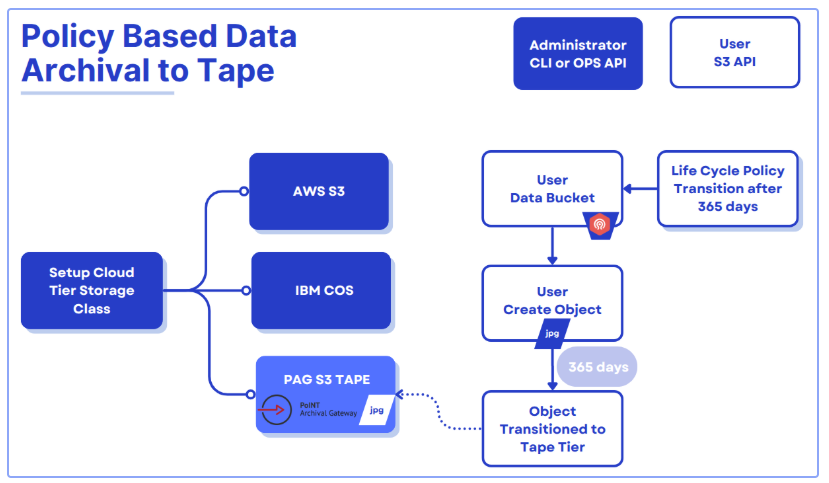
- A Ceph Administrator Setups a Cloud-Tier (Tape) Storage Class
The Ceph administrator (using either the CLI or an operations API) configures a storage tier to route objects to PoINT Archival Gateway (PAG), offering an S3 Tape endpoint. - End User Creates Objects in a Ceph Bucket
An end user (or application) uploads objects (e.g., JPG files) via the standard S3 API into a “User Data Bucket” managed by Ceph Object. Initially, these newly created objects reside in the configured “hot” (or standard) tier. - Lifecycle Policy Governs Transition
A lifecycle policy is defined on the user bucket; for example, it specifies that after 365 days, any object older than that threshold should move to the lower?cost, long?term storage tier (tape) through PAG. - Automatic Archival to Tape
Once an object’s age meets the policy rule (after 365 days), Ceph automatically transitions it to the tape tier through PAG. - Long-Term Storage and Retrieval
After archival, the objects are stored on tape media via PAG. Objects are still referenced in Ceph’s metadata and can be retrieved later using the same S3 Ceph endpoints, the PAG tape tier.
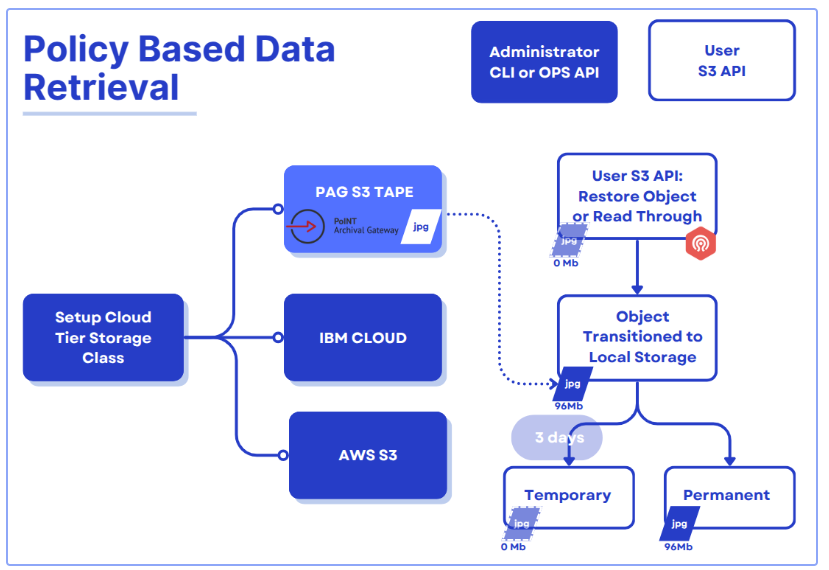
IBM Storage Ceph 8.0 introduced policy-based data retrieval, which marks a significant evolution in its capabilities and is now available as a Tech Preview. This enhancement enables users to retrieve archived objects from S3 Tape endpoints like PAG directly into their on-prem Ceph environment.
Data can be restored as temporary or permanent objects:
- Temporary restores: The restored data bypasses lifecycle cloud-transition rules and is automatically deleted after the specified amount of time, reverting the object to its previous stub state.
- Permanent restores: These fully reintegrate objects into the Ceph cluster where they are treated like (and become) regular objects and subjected to standard lifecycle policy and replication processes.
This retrieval of objects can be done in two different ways:
- S3 RestoreObject API: Allows users to retrieve objects from the remote S3 endpoint using the S3RestoreObject API request
- Read-through Object Retrieval: Enables standard S3 GET requests on transitioned objects to restore them to the Ceph cluster transparently.
Use Cases for Policy Based Archive & Retrieval from Tape
Long-Term Regulatory Compliance
- Auditing & Retention Requirements: Many industries (financial, healthcare, government, etc.) mandate that data be retained for specific durations. Tape storage via PoINT Archival Gateway offers robust, cost-effective retention for compliance.
Media & Content Archiving
- High-Volume Media Libraries: Studios, broadcasters, and content creators can seamlessly tier infrequently accessed assets—like raw footage or archived episodes—to tape.
- On-Demand Retrieval: Producers or editors can conveniently restore assets (even partially) from tape to local Ceph storage for quick re-edits or distribution.
Scientific & HPC Research
- Large Data Sets: Research organizations often generate massive volumes of data that need to be preserved long-term, yet accessed intermittently for analysis.
- Policy-Driven Workflows: Using Ceph’s lifecycle policies, hot scientific data can remain on fast disk while older or completed experimental data moves to tape, cutting down on active storage costs.
Cybersecurity & Ransomware Protection
- Air-Gapped Defense: Tape media provides an inherently offline storage layer, reducing the attack surface for malicious encryption or deletion.
- Immutable Backups: Policy-based retention periods, combined with encryption, and tape’s offline status, safeguard critical data from cyber threats.
Multi-Cloud & Hybrid Strategies
- Consistent S3 Interface: Organizations can leverage tape, public clouds, or on-prem Ceph storage pools using the same S3 APIs and lifecycle policies, simplifying hybrid data flows.
- On-Demand Retrieval: Data archived to tape can be restored as needed without changing application logic, thanks to the same S3 access pattern.
Increasing Data Security and Performance by Erasure Coding on Tape
Data security on the tape media is provided by Erasure Coding. This process stores blocks of data redundantly on multiple media. This means that even if one medium fails, the data will not be lost. PoINT Archival Gateway supports the Erasure Code (EC) rates 1/2, 1/3, 1/4, 2/3, 2/4 and 3/4. In combination with Erasure Coding, data security and redundancy can be further increased, e.g. by using two, three or four tape media in parallel in the tape storage class. Such a combination of multiple media is called a Protected Volume Array. A Protected Volume Array consisting of N tape media can also extend over N tape libraries. The EC rates 1/2, 1/3, 1/4 indicate the automatic creation of copies. For the tape storage class, this means that multiple tape copies can be created (even in different libraries). Throughput rates can be significantly increased with EC rates that distribute data across multiple media (EC 2/3, 2/4, and 3/4).
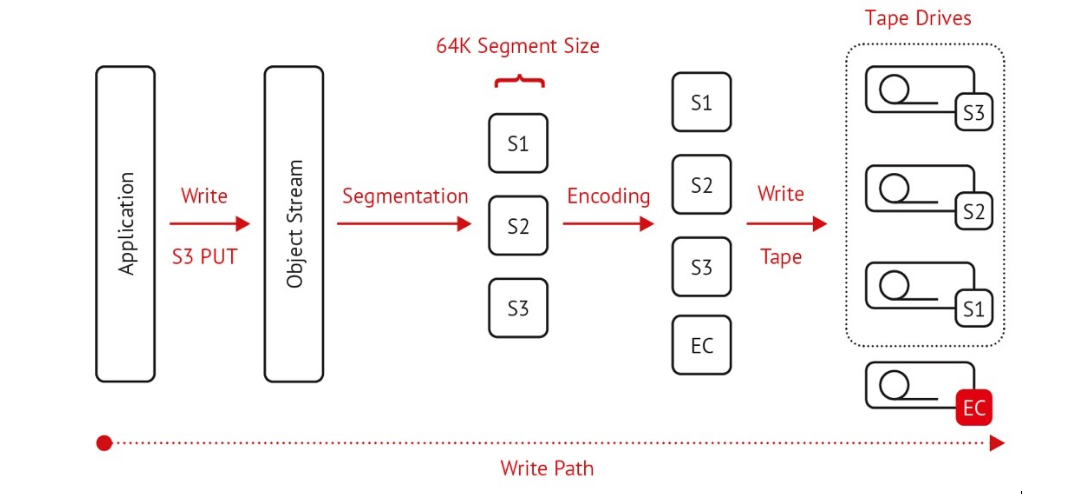
In addition to increased redundancy, throughput rates can be significantly increased with EC rates that distribute data across multiple media (EC 2/3, 2/4, and 3/4).
Deployment Guide (Hands-on Section)
Installing PoINT Archival Gateway on RHEL 9.3
PoINT Archival Gateway (PAG) can be installed on several servers (multi-node installation) in the Enterprise Edition or on one server in the Compact Edition. The following section describes the deployment of the Compact Edition.
Installing the PAG Compact Edition on RHEL 9.3 begins by transferring the installation tarball to your server and extracting its contents. After unarchiving, the next step is to install any required .NET runtimes and configure systemd services so PAG can run in the background.
Here is an example:
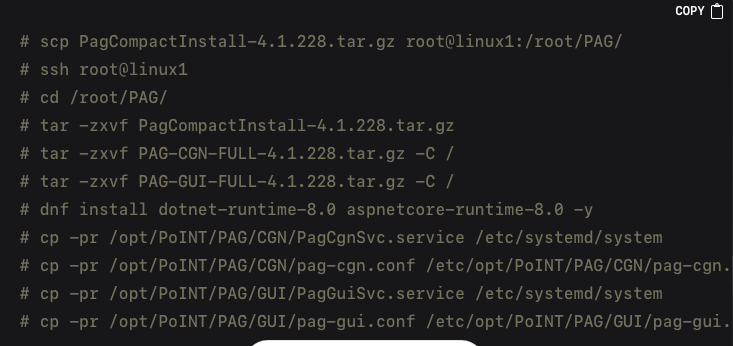
After installing the files and dependencies, it is necessary to update the PAG configuration files in order to reflect the correct IP addresses, ports, and license key. The primary changes typically occur in /etc/opt/PoINT/PAG/CGN/pag-cgn.conf for the S3 REST API and /etc/opt/PoINT/PAG/GUI/pag-gui.conf for the administrative GUI. An example edit might look like this:
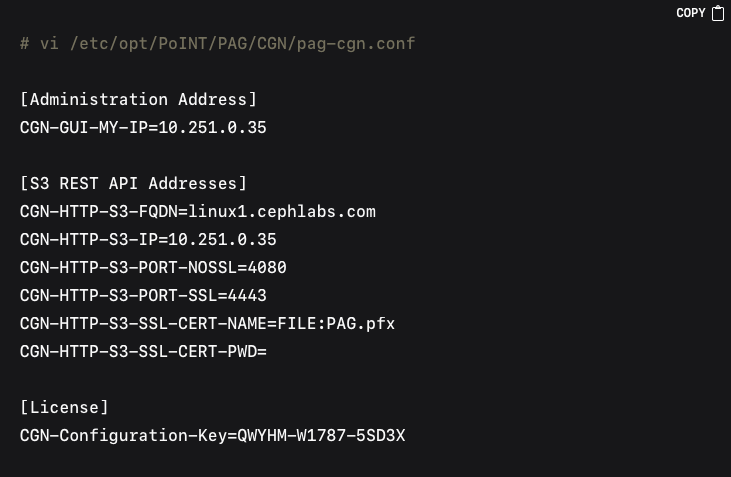
Likewise, editing the GUI configuration file might involve similar IP updates:
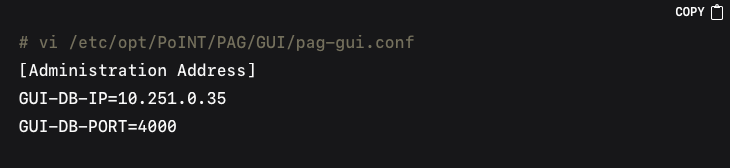
Once the configurations are in place, the services can be enabled and started:

Confirming everything is running allows you to access the PAG GUI through HTTPS on the configured IP address and port. You can then log in with the default admin credentials, enter your License Key, and activate the software through the “System Management” → “Information” section in the PAG GUI.
After licensing is complete, creating a partition and Object Repository in the PAG interface will prepare the backend for storing objects on tape.
Under the menu command “Storage Management” → “Storage Partitions” you get an overview about all created Storage Partition:
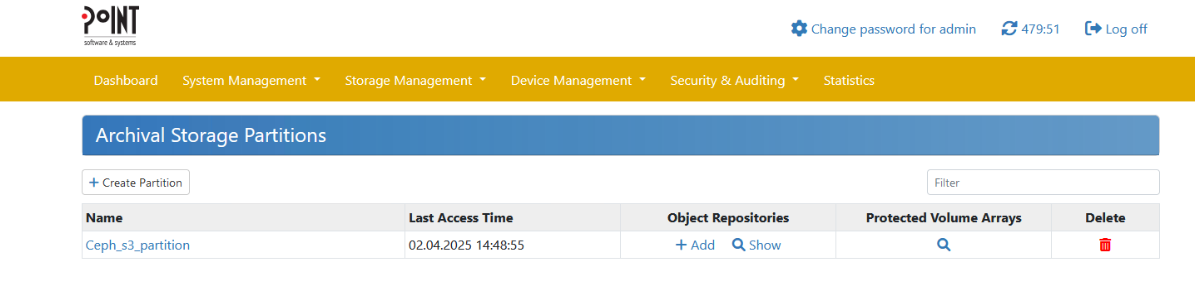
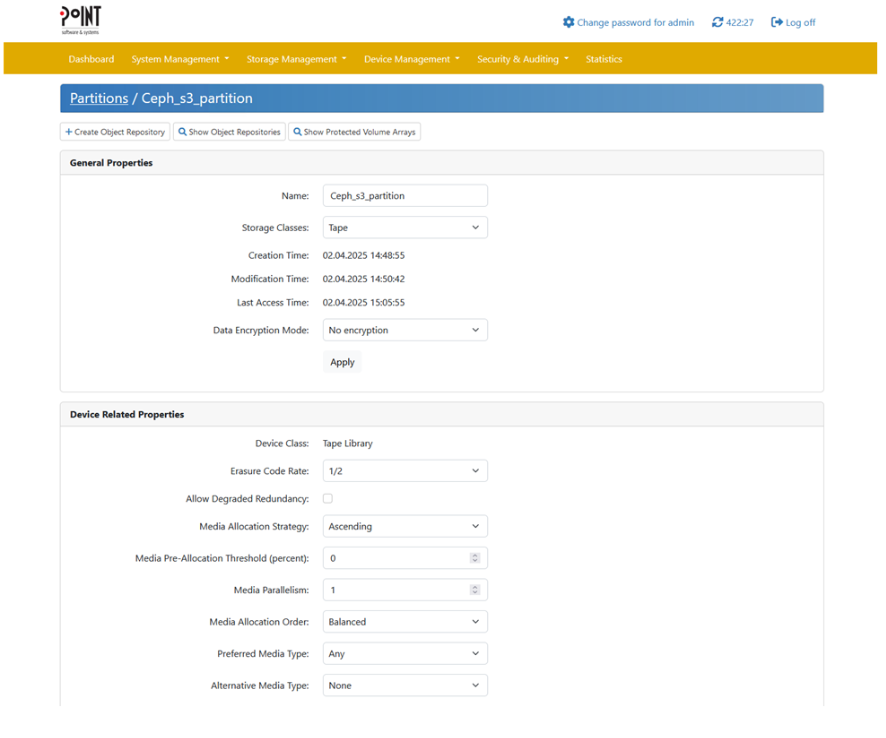
To create a new Storage Partition click on “Create Partition” and fill out the following dialogue:
Under the menu command “Storage Management” → “Object Repositories” you get an overview about all created Object Repositories (Buckets):
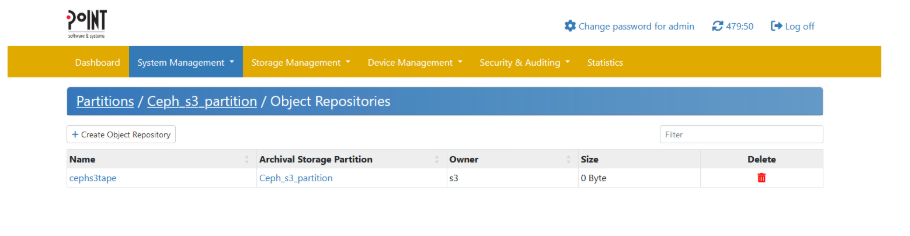
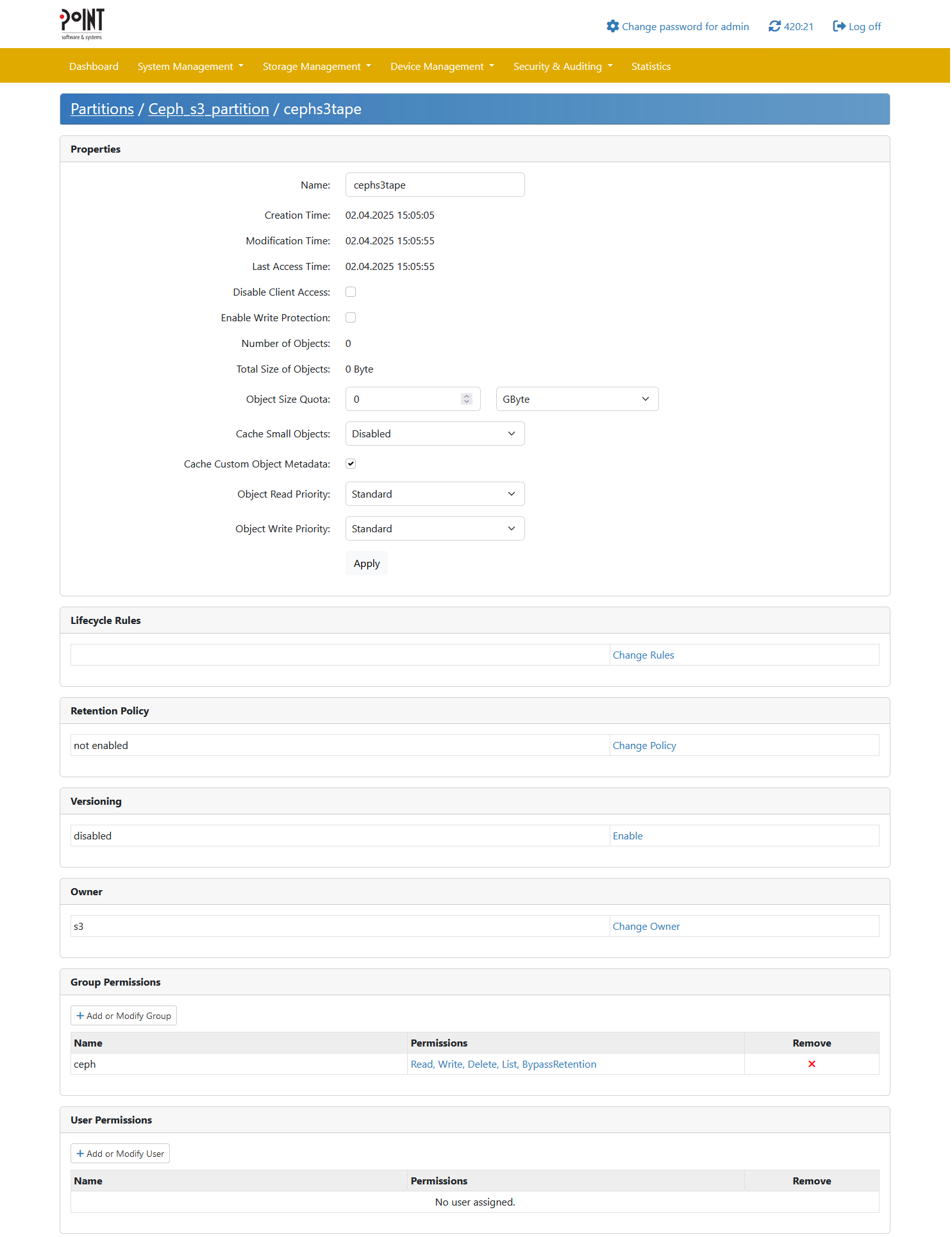
To create a new Object Repository (Bucket) click on “Create Object Repository” and fill out the following dialogue:
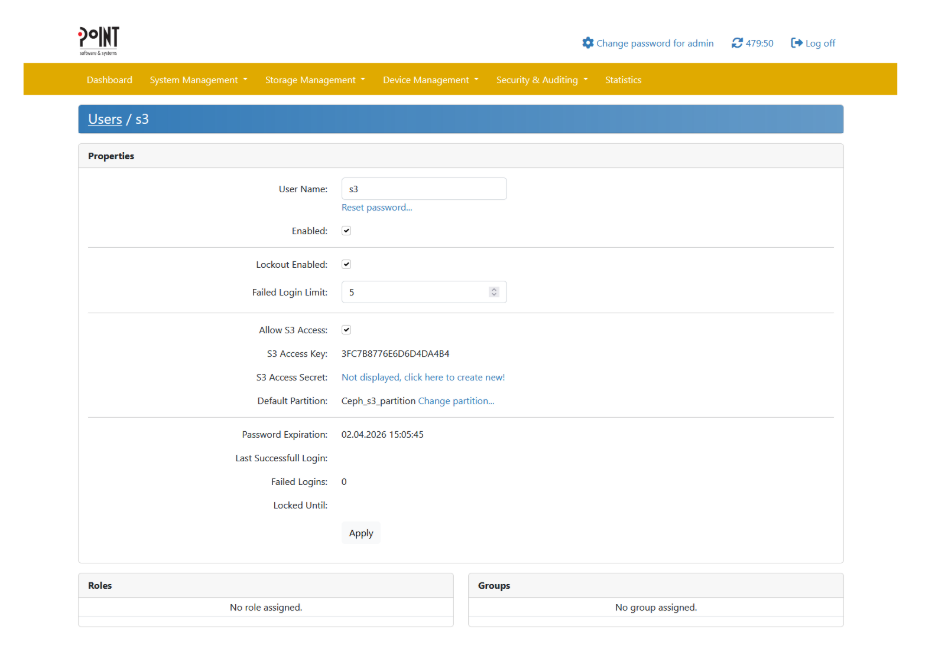
Setting up a user with HMAC credentials will allow Ceph to authenticate against PAG’s S3 endpoint.
Integrating PAG as a Storage Class within Ceph RGW involves configuring a cloud-tier placement for tape using the standard Ceph CLI. Adding a new point-tape storage class to the default placement looks like this:

For a full description of all the configuration parameters available check this link.
We can list our new zonegroup placement configuration with the following command:

NOTE: If you have not done any previous Multisite Configuration, a default zone and zonegroup are created for you, and changes to the zone/zonegroup will not take effect until the Ceph Object Gateways are restarted. If you have created a realm for multisite, the zone/zonegroup changes will take effect once the changes are committed with 'radosgw-admin period update –commit'.

Next comes the creation of a bucket and the assignment of a lifecycle policy.
This policy will automatically transition objects from the STANDARD tier to point-tape after a specified number of days, we first create a bucket called 'dataset':

The contents of point-tape-lc.json might resemble the following:
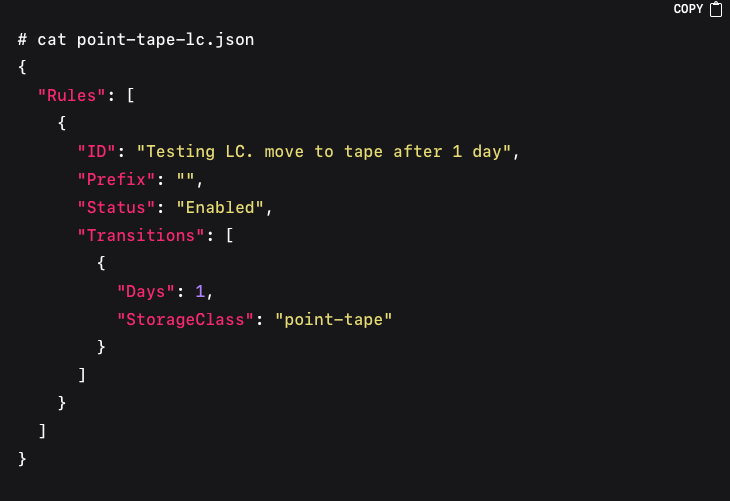
To apply the lifecycle configuration to the 'dataset' bucket, you can apply it using the AWS cli:
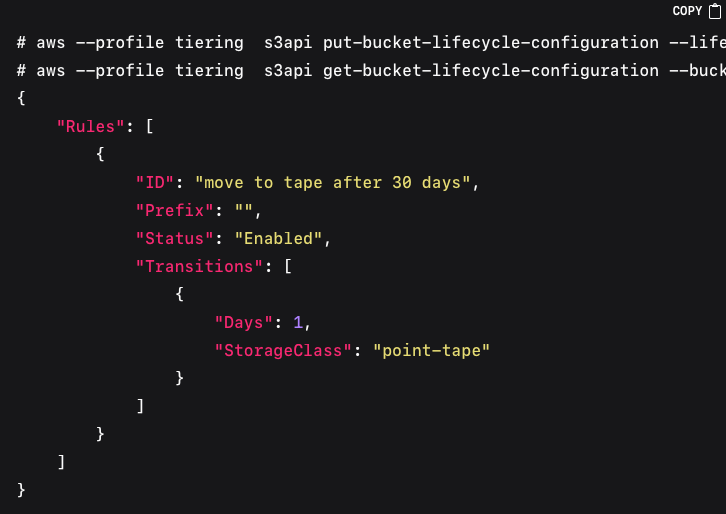
Testing the Integrated Setup includes verifying that newly uploaded objects transition to the PAG tape tier according to the lifecycle rules. Uploading a file to the bucket and confirming its presence happens with:

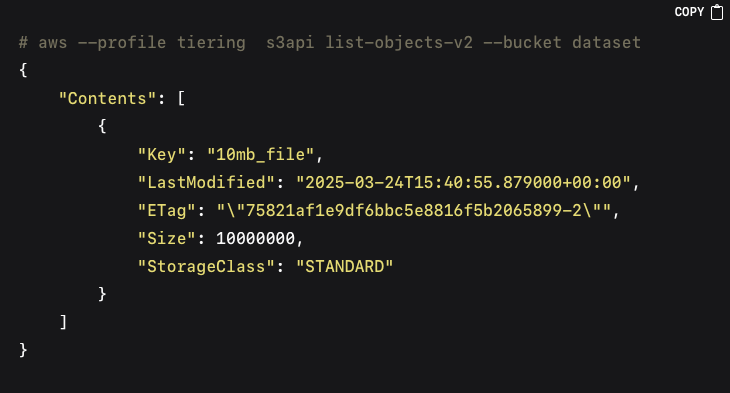
The Ceph lifecycle daemon will run at scheduled intervals. After it completes, you can check whether objects have transitioned, the size of the object in the Ceph bucket will now be 0 as only the stub file remains the in the local Ceph cluster, and the 'StorageClass' will now be 'point-tape':
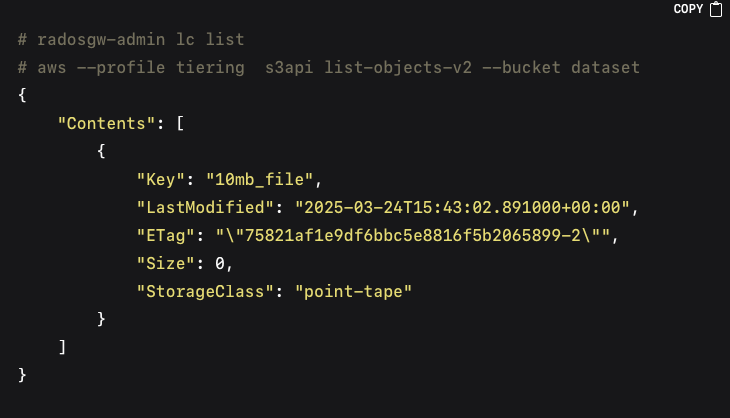
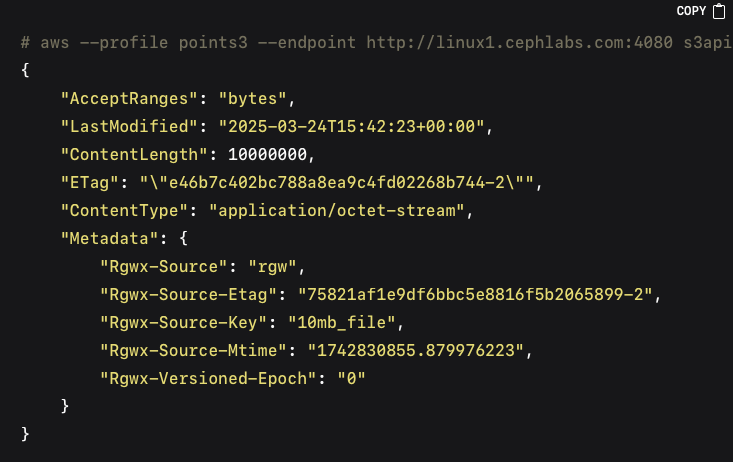
In the output, 'StorageClass' should change to 'point-tape' for objects that have been migrated to the PAG tier. Validating the actual data in the PAG backend is done by querying the bucket path in PAG via its S3 REST API:
Object Retrieval Workflow can then be tested by triggering a restore. A restore request can be made with the restore-object API call, we will first test with a temporary restore, the object will be available in our Ceph Cluster for three days, expiry date for the object is part of the restored object metadata:

You can later confirm that the restored object is accessible and listed in Ceph, because this is a temporary restore, the storage class won’t be modified it will still be 'point-tape' and the object won’t be part of LC policies or multisite replication:

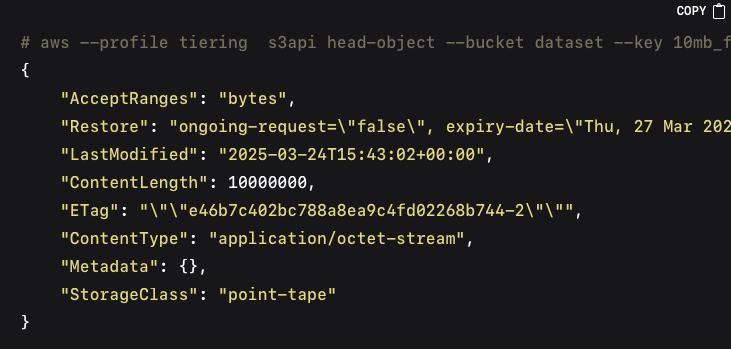
If we don’t specify the days in the restore request, this will trigger a permanent restore of the object; here is an example, we upload a new file into our 'dataset' bucket:

After the LC policy kicks in the object is transitioned to tape, as we can see by the storage class ouput of the head object call:

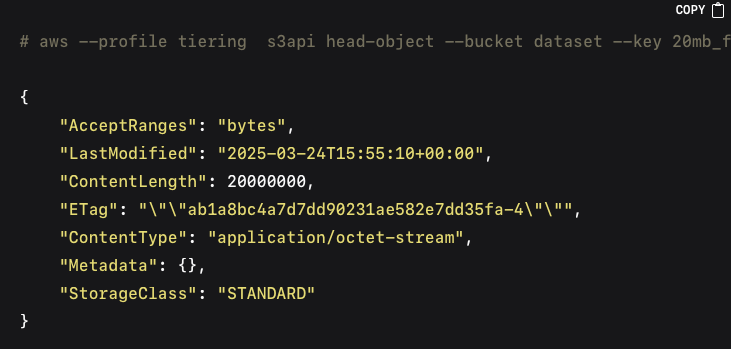
I will now use the RestoreObject API call without specifying the number of days in the restore-request field, this will cause the restore to be permanent:

We can see that because of the restore being permanent the storage class has gone back to being 'STANDARD', and there is no expiration date for the restore:
Conclusion
By following the above approach, you can effectively deploy the PoINT Archival Gateway, integrate it into IBM Storage Ceph as a new tape storage tier, and validate the entire lifecycle workflow — from upload and automatic migration to restore and verification. This combined solution reduces storage costs, enhances data protection and compliance, and provides on-premises tape capabilities through a familiar S3 interface.